반응형
일반적인 백엔드 개발자 관점에서 학습한 내용을 정리한 글로 부정확한 내용이 있을수있습니다.
LLM 공부와 LLM을 활용한 서비스 구현을 계획하면서 공부하면서 자연스럽게 파이썬 생태계에서 시작된 LangChain을 접하게 되었습니다. 예전 같으면 모델 API 연동, RAG용 외부 데이터 연결, 프롬프트 설계 등을 각각 구현했을 것입니다.
LangChain은 프롬프트·체인·RAG·에이전트·툴까지 LLM 기반 서비스 전 과정을 아우르는 프레임워크/라이브러리 모음입니다.
이 글에서는 제가 이해한 LangChain의 핵심과 간단한 활용 예제를 간단히 정리하겠습니다.
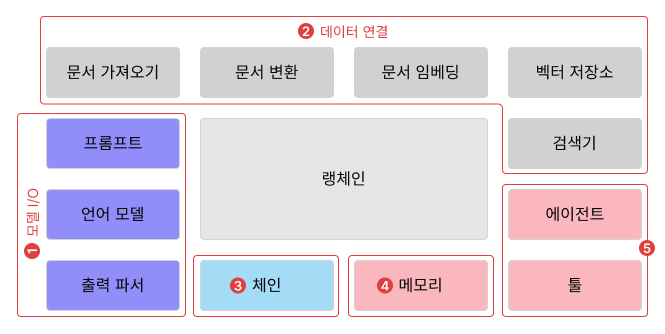
1. 모델 I/O
- LLM 과 상호작용 (Input, Output) 하기 위한 컴포넌트 영역
- LLM에 전달할 프롬프트 생성
- 입력 임베딩 & RAG 검색 결과
- LLM API 호출
- LLM 응답 출력
- 구조화된 정보를 얻고자할때 출력 파서 이용
- JSON, CSV 등 LLM에 출력 형식을 알려주고 응답을 파싱
- 예시코드
from langchain import PromptTemplate
from langchain.chat_models import ChatOpenAI
from langchain.output_parsers import CommaSeparatedListOutputParser

openai = ChatOpenAI(temperature = 0, model_name='gpt-4')

output_parser = CommaSeparatedListOutputParser()
format_instructions = output_parser.get_format_instructions()

# 프롬프트 생성 (문자열 템플레이팅, 출력 형식 지정)
prompt = PromptTemplate(
    template = "7개의 팀을 보여줘 {subject}.\\n{format_instructions}",
    input_variables = ["subject"],
    partial_variables={"format_instructions": format_instructions}
)

# LLM API 호출 & 응답 수신
res = openai.predict(prompt.format(subject="한국의 야구팀은?"))

# 결과 파싱 (이 케이스에선 콤마로 연결된 값들을 List로 변환)
print(output_parser.parse(res))
2. 데이터 연결
- 데이터 ETL에 해당
- 문서 가져오기 (document loaders) : 다양한 소스에서 문서를 가져오는 것
- 문서 변환 (document transformers) : 문서를 청크로 분할하고 결합 등
- 문서 임베딩 (embedding model): 문서를 벡터 임베딩
- FAISS (인메모리 벡터 DB)
- 벡터 저장소 (vector stores) : 임베딩 결과물 적재
- 검색기 (retrievers) : 언어 모델과 결합할 문서 가져오기 위한 정보 검색
- 예시 코드
- PDF Read → 임베딩하여 인메모리 벡터 DB에 저장
- 체인을 활용해 LLM과 백터DB를 연결
from langchain.document_loaders import PyPDFLoader
from langchain.vectorstores import FAISS
from langchain.embeddings import OpenAIEmbeddings
from langchain.chat_models import ChatOpenAI
from langchain.chains import RetrievalQA

loader = PyPDFLoader("path/to/pdf")
document = loader.load()

# OpenAI 임베딩 사용. 벡터만 다루고자 하면 embeddings 객체 활용 가능
embeddings = OpenAIEmbeddings()

# 인메모리DB FAISS 에 임베딩 벡터 저장
# 검색 도구 (Retriever 로 사용)
db = FAISS.from_documents(document, embeddings)
retriever = db.as_retriever()

llm = ChatOpenAI(temperature = 0, model_name = 'gpt-4')
qa = RetrievalQA.from_chain_type(
    llm = llm,
    chain_type = "stuff",
    retriever = retriever
)

qa({ "query": "PDF 파일에 내용을 검색하면 잘 답변해준다." })
3. 체인
- Langchain 내 여러 컴포넌트들을 묶어 하나의 행위를 만들어주는 역할
- 기본적인 예시
from langchain.chains import LLMChain
from langchain import PromptTemplate
from langchain.chat_models import ChatOpenAI

llm = ChatOpenAI(temperature = 0, model_name = 'gpt-4')

prompt = PromptTemplate(input_variables = ["country"], template = "{country}의 수도는 어디야?")

# LLM 과 프롬프트를 연결한 예시
chain = LLMChain(llm = llm, prompt = prompt)
chain.run("미국")
- 여러 체인 연결하여 사용하는 예시
- 특정 체인의 출력값을 다음 체인의 입력값으로 사용
from langchain.chains import LLMChain, SequentialChain
from langchain import PromptTemplate
from langchain.chat_models import ChatOpenAI
import os

os.environ["OPENAI_API_KEY"] = "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"

# LLM 생성
llm = ChatOpenAI(temperature = 0, model_name = 'gpt-4')

# 번역체인 생성 (번역 프롬프트 + LLM)
translatePrompt = PromptTemplate.from_template("다음 문장을 한글로 번역하세요.\\n\\n{sentence}")
translateChain = LLMChain(llm=llm, prompt=translatePrompt, output_key="translation")

# 요약체인 생성 (요약 프롬프트 - 번역체인 결과값 사용 + LLM)
summaryPrompt = PromptTemplate.from_template("다음 문장을 한 문장으로 요약하세요.\\n\\n{translation}")
summaryChain = LLMChain(llm=llm, prompt=summaryPrompt, output_key="summary")

# 최종 체인 (번역체인 -> 요약체인 순으로 수행)
aggregateChain = SequentialChain(
    chains=[translateChain, summaryChain],
    input_variables=['sentence'],
    output_variables=['translation', 'summary']
)

sentence="""
Ukraine’s President Volodymyr Zelenskyy, who has a checkered relationship with Trump and was not invited to the talks, will be nervous as they get underway. On Friday, the president commented on X that “it is time to end the war, and the necessary steps must be taken by Russia. We are counting on America.”
Both he and his European allies fear the U.S. leader could capitulate to skilled negotiator Putin’s likely demands for Moscow to retain occupied Ukrainian territory and cut short Ukraine’s NATO membership aspirations, in return for halting its military offensive.
As he headed off to Alaska on Air Force One, Trump told reporters that “something is going to come of it [the meeting].” When asked about Russia’s ongoing attacks on Ukraine, the president said Putin “thinks that gives him strength in talks, I think it hurts him,” in comments reported by Reuters.
Trump also insisted that Ukraine has to decide about its territory and that security guarantees were “possible along with Europe,” without giving further detail.
What’s the schedule?
On Friday, the White House confirmed that the U.S. delegation includes Secretary of State Marco Rubio, Treasury and Commerce Secretaries Scott Bessent and Howard Lutnick, CIA Director John Ratcliffe and Special Envoy Steven Witkoff, as well as other senior U.S. officials.
Moscow released more details about the summit earlier than Washington, however, which only this week confirmed that the presidents’ talks would be a “one-on-one” meeting.
"""

aggregateChain.invoke(sentence)
4. 메모리
- LLM은 기본적으로 채팅 기록을 장기적으로 보관하지 않고 따로 저장해놔야하는데 랭체인에서 제공하는 컴포넌트를 사용하면 쉽게 구현할 수 있음
from langchain import ConversationChain
from langchain.chat_models import ChatOpenAI
import os

os.environ["OPENAI_API_KEY"] = "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"

llm = ChatOpenAI(temperature = 0, model_name = 'gpt-4')

conversation = ConversationChain(llm = llm, verbose=True)

# 아래 대화 내용들이 메모리에 저장되어 LLM 이 기억함
conversation.predict(input = "진희는 강아지를 한마리 키우고 있습니다.")
conversation.predict(input = "영수는 고양이를 두마리 키우고 있습니다.")
conversation.predict(input = "진희와 영수가 키우는 동물은 총 몇마리?")
5. 에이전트 / 툴
- 학습되지 않은 정보에 대해서는 전혀 모르는 LLM의 한계를 해소하기 위한 것이다.
- 에이전트도 주어진 프롬프트에 답변하는것이 목적으로 LLM과 유사하지만 방식이 LLM 과 크게 다르다
- 에이전트는 LLM 을 이용해서 어떤 작업을 어떤 순서로 수행할지 결정하는데, “어떤 작업”에 툴을 사용한다.
- 이때 에이전트 유형(AgentType)에 따라 LLM이 어떻게 툴을 결정하도록 할 지 지정할 수 있음
- ZERO_SHOT_REACT_DESCRIPTION : 스스로 선택 X. 언제 툴을 쓸 지 설명 필요
- REACT_DOCSTORE : 질문에 답하기 위해 검색 도구가 필요함
- …
- 툴은 특정 작업을 수행하기 위한 도구로 LLM 이외 다른 리소스를 의미한다.
import os
from langchain.chat_models import ChatOpenAI
from langchain.agents import load_tools, initialize_agent, AgentType

os.environ["OPENAI_API_KEY"] = "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"

llm = ChatOpenAI(temperature = 0, model_name = 'gpt-4')

# wikipedia, llm-math 툴 사용
tools = load_tools(["wikipedia", "llm-math"], llm=llm)

# 위 툴을 이용하는 Agent 생성
agent = initialize_agent(tools, llm, agent = AgentType.ZERO_SHOT_REACT_DESCRIPTION, description='계산이 필요할 때 사용', verbose=True)

agent.run("에드 시런이 태어난 해는? 2025년도 현재 에드 시런은 몇 살?")
- 에이전트는 결국 LLM이 "생각 → 도구 선택 → 실행 → 결과 결합" 과정을 통해 외부 세계와 상호작용하면서 답하는 기능을 묶어둔 것이다.
반응형
'AI & LLM' 카테고리의 다른 글
| [Spring AI 공식문서 읽기] 3. Advisors API (0) | 2025.10.14 |
|---|---|
| [Spring AI 공식문서 읽기] 2. ChatClient API (0) | 2025.10.05 |
| Spring AI 를 활용한 MCP 서버 구현 및 Claude AI에 적용하기 (0) | 2025.10.03 |
| [Spring AI 공식문서 읽기] 1. Spring AI 핵심 개념과 컨셉 (1) | 2025.08.31 |
| LLM 기본 개념 (3) | 2025.08.24 |